

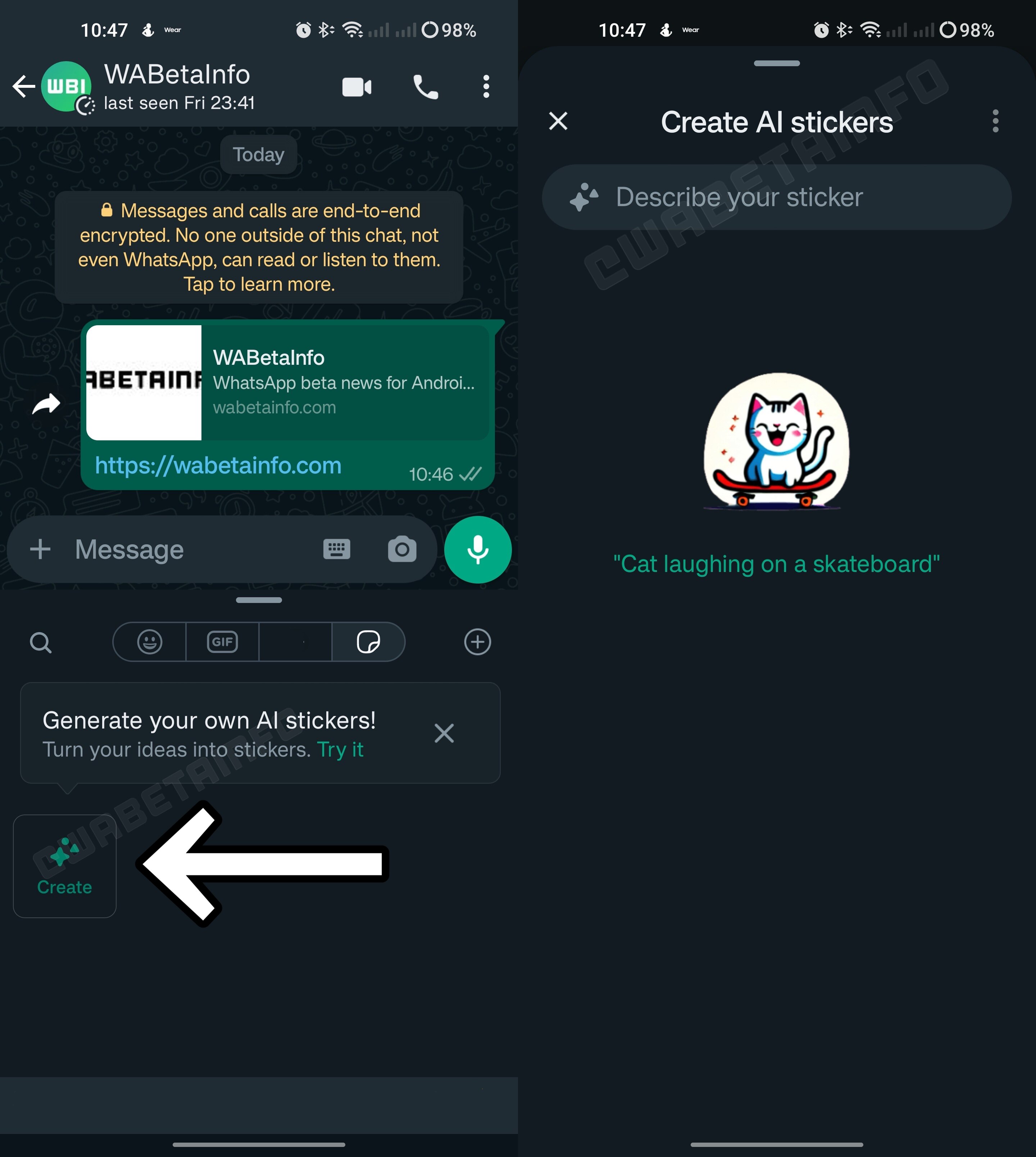
WhatsApp allows beta testers to share & make AI stickers
The new feature of WhatsApp is currently only accessible to beta testers, but will soon be made available to all users.
 artificial intelligence
New Delhi, UPDATED: Aug 28, 2023 13:35 IST
Highlights
- WhatsApp has begun to roll out the feature to share and create AI stickers.
- WhatsApp has recently launched the Screen Share feature
Recently, WhatsApp gave its users the option to share screens during video calls. The Meta-owned site is now reportedly introducing a new feature that will let users make and share AI stickers, according to a recent online report.
The feature is currently only accessible to android beta testers, but it will soon be made available to all users, which is included in update version 2.23.17.8.
advertisement
Features accessible to beta testers
According to the report, after the installation of the update, Android beta testers will see a new 'Create' button. The user will be asked to input a description to create a sticker after choosing this option. Later, the user can choose which sticker to share in a conversation after WhatsApp presents a set of AI stickers based on the previously given description.
Also Read
"You’re always in control over stickers generated by AI: in case you think a sticker is inappropriate or harmful, you can report it to Meta. In addition, it’s important to note that this feature is optional and those AI stickers are easily recognisable. This means that the recipient may understand when a sticker has been generated by the AI technology from Meta," mentions the report.
WhatsApp’s recent features
WhatsApp has recently launched the Screen Share feature to its global user community after a lengthy beta testing phase that lasted almost two months. As the name suggests, this feature enables users to share their phone and computer screens with others while being engaged in video chats. It's crucial to note that some content types are still ineligible for sharing, and WhatsApp has meticulously put in place a number of security measures to guarantee the safety of user privacy.
advertisement
The company has also added a brand-new landscape mode. The landscape mode offers a wider and more panoramic perspective of the video call interface than the traditional portrait mode does. By enabling this option, call participants can easily see more people on the screen at once, greatly improving the overall video conference experience.
Published on: Aug 16, 2023 17:39 ISTPosted by: nidhi bhardwaj, Aug 16, 2023 17:39 IST
COMMENTS 0